How to Build a High-Quality B2B Lead List
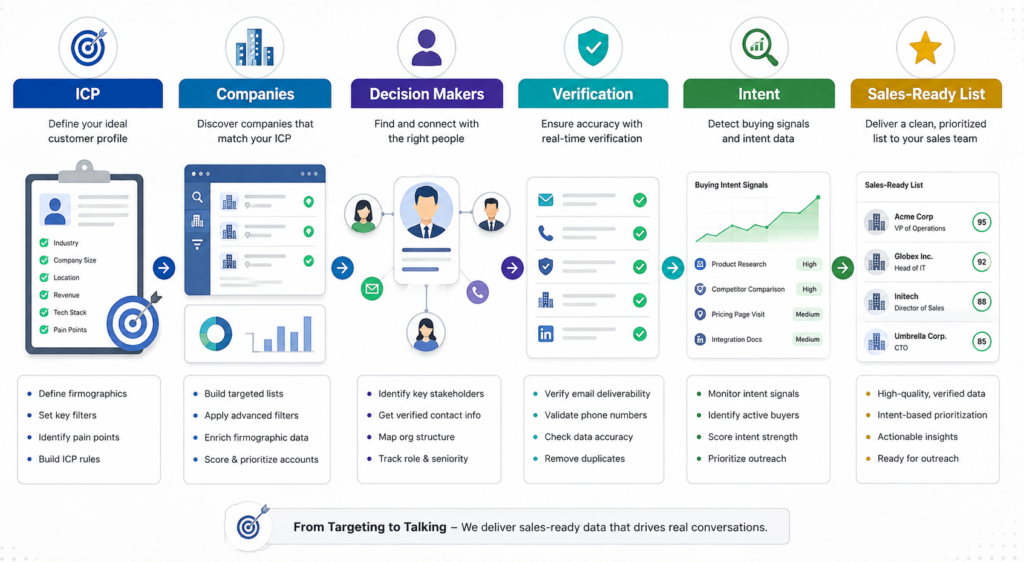
A strong B2B lead list is more than a collection of names and email addresses. It starts with the right companies, the right decision-makers, accurate contact information, and a verification process that removes unreliable records before they reach your sales workflow.
This guide walks through a practical process for building a B2B lead list that sales teams can actually use — from defining your ideal customer profile to researching contacts, verifying information, identifying buying signals, and maintaining data quality.
What Makes a B2B Lead List High Quality?
Right Company
The company matches your industry, geography, size, business model, or other ICP requirements.
Right Contact
The person has the appropriate job title, seniority, responsibilities, and relationship to the buying process.
Reliable Data
Contact and company information has been checked for accuracy, duplicates, and email deliverability before outreach.
1. Define Your Ideal Customer Profile
Before building a B2B lead list, define exactly which companies and decision-makers you’re trying to reach. A clear ICP helps prevent your list from becoming a collection of contacts that look relevant but don’t actually fit your sales strategy.
If you’re building a list specifically for SaaS lead generation, for example, you may want to define your target companies by industry, geography, employee count, technology, growth stage and business model.
Start With Company-Level Criteria
Consider:
Define the People You Want to Reach
Then identify the people who are most relevant to the buying process:
2. Build a Target Company List
A common mistake in B2B lead generation is to start by searching for people and trying to collect as many contacts as possible.
The goal shouldn’t be:
“Find 10,000 people.”
It should be:
“Find the right companies first, then identify the right people inside those companies.”
A high-quality B2B lead list starts with account selection. If a company doesn’t fit your ideal customer profile, finding the perfect decision-maker inside that company doesn’t make the contact a good prospect.
Start With the Right Companies
Begin by creating a list of companies that match your predefined ICP. Depending on your sales strategy, this might include criteria such as:
For example, a SaaS company selling sales automation software might target US-based B2B SaaS companies with 50–500 employees rather than simply searching for anyone with a “VP Sales” title.
This account-first approach gives the subsequent contact research a clear purpose.
Use Multiple Sources to Research Companies
No single source should necessarily be treated as the complete source of truth for every company.
Depending on the information required, legitimate research sources can include:
Company websites — useful for confirming the company’s products, services, industry, location and business focus.
LinkedIn and company research — useful for understanding the company’s current structure, employees, leadership and relevant departments.
Industry directories and professional associations — useful for discovering companies within specific industries or niches.
B2B databases and research platforms — useful for building an initial pool of potential accounts using firmographic and other available filters.
The purpose of using these sources is not simply to collect more records. It is to cross-check information and narrow the pool to companies that genuinely fit the target criteria.
Then Identify the Right People
Once the target companies have been established, move from account research to contact research.
For each qualified company, identify the people who are most likely to influence or participate in the purchasing decision.
Depending on the product and company size, this could include:
The right contact isn’t necessarily the most senior person at the company. Relevance to the buying process matters more than title alone.
For example, if you’re selling a sales intelligence platform, a VP of Sales may be a more relevant prospect than the CEO of a 500-person company, while a Founder may be the appropriate contact at a 15-person startup.
Account-First Research Creates a Better List
This process changes the objective from volume to relevance:
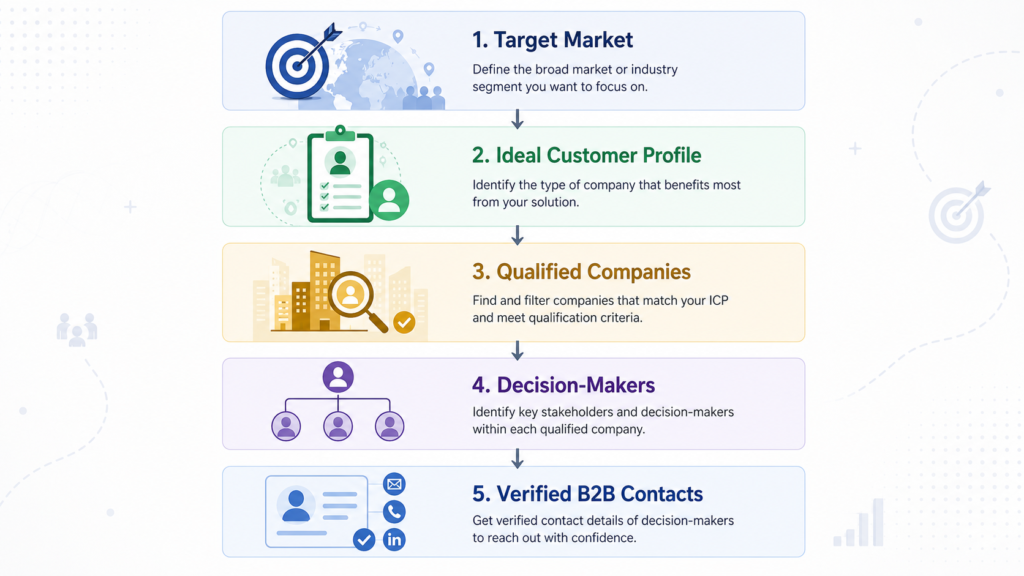
Broad market → Target companies → Qualified accounts → Relevant decision-makers → Verified contacts
The result is a prospect list built around your actual sales strategy rather than a large collection of names that may have little connection to your ideal customer profile.
Quality starts before contact verification.
Verifying an inaccurate or irrelevant contact doesn’t make that contact a good prospect. Effective B2B list building starts by selecting the right accounts and identifying the right people before validating their contact information.
3. Identify the Right Decision-Makers
Once you’ve identified companies that match your ideal customer profile, the next step is to find the people who are actually relevant to your sales process.
This sounds straightforward, but identifying the right contact is often more complicated than searching for a job title.
A company might have a VP of Sales, Head of Revenue, Sales Director, CRO, Revenue Operations Manager, and Sales Enablement Manager at the same time. Depending on what you’re selling, several of these people could be relevant — while others may have little or no involvement in the purchasing decision.
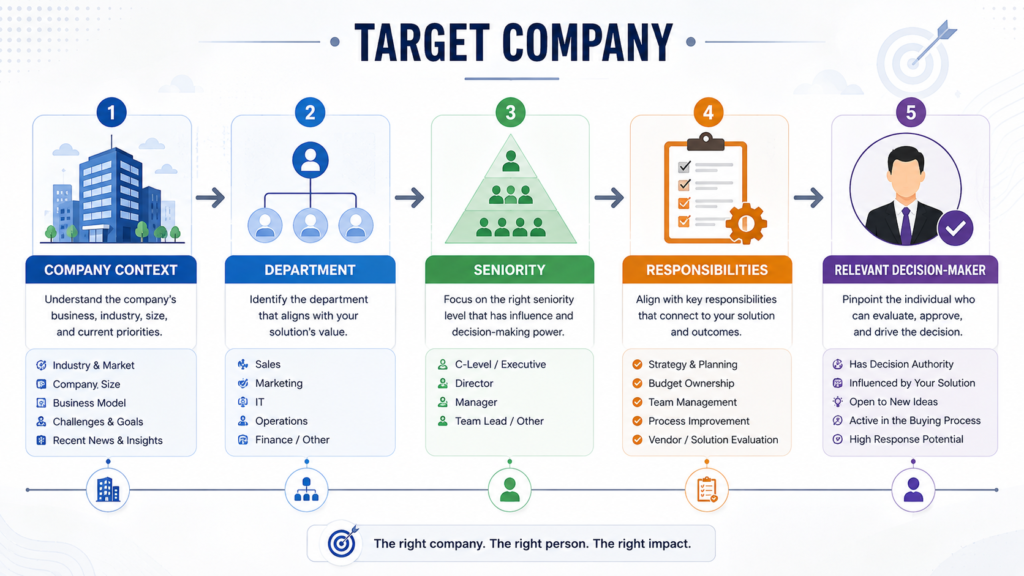
That’s why effective B2B contact research should consider the person’s role within the organization, not just the title displayed on their profile.
Look Beyond Job Titles
Job titles are useful starting points, but they shouldn’t always be treated as definitive.
The same responsibilities can appear under different titles at different companies. For example:
Conversely, two people with similar titles may have completely different responsibilities.
For this reason, contact research should consider the company’s size, organizational structure, department and business model alongside the job title.
Verify the Person’s Current Role
Before adding a contact to a sales list, check whether the person actually appears to hold the relevant position at the target company.
Useful checks include:
This is particularly important because B2B contact databases can contain information that has become outdated.
Someone who was a VP of Sales six months ago may have since moved to another company, changed roles or left the organization entirely.
A contact should therefore be considered relevant based on their current relationship with the target company, rather than simply because an old database record contains the right title.
Match Seniority to the Buying Process
The most senior person isn’t automatically the best prospect.
Consider a company purchasing a sales technology platform. The CEO may ultimately approve the purchase, but the evaluation could involve:
The appropriate contact depends on who experiences the problem, who evaluates the solution, who influences the decision and who ultimately approves the purchase.
For smaller businesses, one person may perform several of these functions. In larger organizations, the responsibilities may be distributed across several departments.
Consider the Department
The same job title can have very different relevance depending on the department.
For example, if you’re selling a sales prospecting solution, a VP of Sales is likely to be more relevant than someone in an unrelated operational role.
If you’re selling a cybersecurity product, however, the relevant contacts may include:
The key is to connect the product’s business problem with the person who is most likely to own, influence or evaluate that problem.
Look at Responsibilities, Not Just Titles
Whenever possible, look at what the person actually does.
A person’s profile, company page, professional biography or other reliable information may provide useful context about their responsibilities.
For example:
“VP of Sales” tells you the person’s title.
But information about their responsibilities might tell you whether they oversee:
That additional context can help determine whether the contact genuinely matches the campaign you’re building.
Consider Multiple Stakeholders
Some B2B purchases involve more than one decision-maker.
Instead of identifying only one person at an account, sales teams may benefit from identifying several relevant stakeholders when the buying process is likely to involve multiple departments.
For example:
Target company
→ VP Sales — business owner
→ Revenue Operations — process/technology stakeholder
→ IT — technical stakeholder
→ Procurement — purchasing stakeholder
This is sometimes called multi-threading: developing relationships with multiple relevant people within the same account rather than depending entirely on a single contact.
However, this doesn’t mean adding every employee at the company to your database.
The goal is to identify relevant stakeholders, not maximize the number of contacts per account.
Human Research Makes a Difference
Automated databases can be useful for discovering potential contacts, but they don’t always provide enough context to determine whether a person is genuinely relevant to a particular campaign.
Human research can help resolve situations such as:
The objective isn’t simply to find a person who matches a keyword.
The objective is to determine whether that person is a relevant prospect for the specific campaign.
That’s an important distinction when building a sales-ready B2B contact list.
The Right Title Doesn’t Always Mean the Right Contact
A job title is only one part of contact qualification. Company size, department, seniority, responsibilities and the product being sold can all affect whether a person is actually relevant to a sales campaign.
4. Verify Company and Contact Information
Finding a contact who appears to match your target criteria is only the beginning. Before adding that person to a sales-ready list, the contact and company information should be checked for accuracy and relevance.
A good verification process confirms that the company is genuine, the contact currently works there, the job title is relevant, and the available contact information corresponds to the correct person and organization.
What Should Be Verified?
At a minimum, review the following:
Cross-Check Important Information
It’s risky to treat a single database record as definitive.
Information can become outdated when people change jobs, companies restructure their teams, websites change domains, or databases fail to update their records promptly.
Cross-checking important information against multiple relevant sources can help identify discrepancies before the contact reaches your sales team.
For example, if a database lists someone as Head of Sales, but the person’s current professional profile shows a different company and role, the record should not simply be accepted because the database says it is valid.
Verification Is More Than Email Validation
Email verification is an important part of data quality, but it doesn’t answer every question about a prospect.
An email address can be technically deliverable while:
That’s why contact verification and email verification should be treated as related but separate processes.
Follow a Consistent Verification Standard
A repeatable process makes it easier to maintain consistent data quality across larger contact lists.
Your verification criteria can define:
For a deeper look at the criteria that can be used to evaluate B2B contact quality, see our B2B contact verification standards.
Verification Should Happen Before Outreach
A contact shouldn’t become sales-ready simply because a database contains an email address. Company relevance, contact identity, job title, domain and email quality should all be considered before the record enters your outreach workflow.
5. Verify Email Addresses Before Outreach
Finding a professional email address is not the same as knowing that the address is safe and suitable for outreach.
A database may provide an email address that appears to belong to the right person, but the address could be outdated, undeliverable, risky, or otherwise unsuitable for a campaign.
That’s why email verification should happen before a contact is added to your active outreach list.
Google’s email sender guidelines
Finding an Email Address and Verifying an Email Address Are Two Different Steps
An email discovery tool may help you identify a possible address based on a person’s name, company and domain.
For example, a database might identify:firstname.lastname@company.com
That tells you that the address may exist.
It doesn’t necessarily tell you that:
Email verification adds another layer of validation before the address is used for outreach.
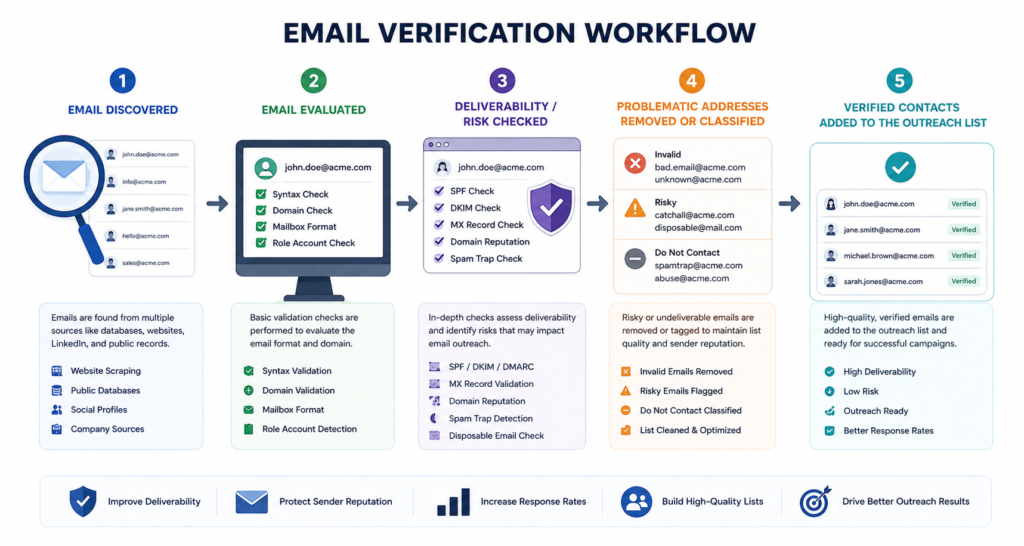
What Should an Email Verification Process Check?
A comprehensive verification process can evaluate several characteristics of an email address.
Invalid or Undeliverable Addresses
An address may no longer exist because the employee left the company, the mailbox was deleted, or the address was entered incorrectly.
Sending campaigns to large numbers of invalid addresses can result in unnecessary hard bounces and reduce the quality of your mailing lists.
These addresses should generally be removed before outreach.
Hard Bounce Risk
A hard bounce generally indicates that an email could not be delivered for a permanent reason, such as a nonexistent mailbox or domain.
A high number of hard bounces can be a warning sign that your contact data needs better validation.
The goal of verification is therefore not simply to collect more addresses, but to reduce the number of problematic addresses entering your outreach workflow.
Catch-All Domains
Some mail servers are configured to accept messages for multiple or even all addresses associated with a domain, making it difficult for verification systems to determine whether a particular mailbox actually exists.
These addresses may therefore require additional caution rather than being treated in exactly the same way as clearly valid addresses.
Role-Based Addresses
Addresses such as:
may belong to a department or shared mailbox rather than an individual decision-maker.
For personalized B2B outreach, a named professional contact is often more useful than a generic departmental address.
That doesn’t mean every role-based address is inherently unusable. Their suitability depends on the purpose of the campaign.
Disposable Email Addresses
Disposable or temporary email services are designed to provide short-lived inboxes.
These addresses generally have little value for long-term B2B prospecting and should normally be excluded from a sales contact list.
Risky or Uncertain Addresses
Some addresses cannot be confidently classified as either clearly deliverable or clearly undeliverable.
Instead of treating every address as simply “valid” or “invalid,” a good verification process can assign appropriate statuses or risk categories so that sales teams can make better decisions about which contacts to use.
Email Verification Helps Protect List Quality
Email verification is particularly important when building large B2B prospect lists.
Imagine a list containing 1,000 contacts.
If the list contains a significant number of outdated or invalid addresses, sending the entire list directly into an outreach campaign can create unnecessary delivery problems.
A better workflow is:
Don’t Confuse Email Verification With Contact Verification
These two processes complement each other, but they answer different questions.
Contact verification asks:
Is this the right person at the right company?
Email verification asks:
Is this email address suitable for delivery based on the available verification signals?
A contact can therefore be professionally relevant while still having an email address that shouldn’t be used.
Likewise, an email address can appear technically deliverable while belonging to a person who no longer holds the relevant position.
The strongest B2B contact lists consider both sides of the equation.
Keep Verification Data Fresh
B2B contact data changes continuously.
People change jobs, companies restructure, domains change, and email accounts are created or deactivated.
For that reason, verification shouldn’t be viewed as a permanent guarantee that a contact will remain accurate forever.
Where possible, record useful quality information such as:
This gives sales teams additional context when deciding whether a contact is ready for outreach.
Don’t Treat Every “Valid” Email the Same
Email verification is one part of B2B data quality. A technically deliverable address isn’t automatically a relevant prospect. The contact’s identity, current role, company, domain and campaign relevance should also be evaluated before outreach.
6. Enrich the List With Direct Phone Numbers When Needed
Email may be the preferred channel for many B2B campaigns, but some sales teams also rely on phone outreach. In those cases, adding a direct phone number can make a prospect list more useful for multi-channel outreach.
However, phone numbers shouldn’t simply be added to every contact without considering whether the number is actually relevant and available.
Prioritize Direct Numbers Over General Company Numbers
A company’s main switchboard or general business number isn’t the same as a contact’s direct phone number.
If the goal is to reach a specific decision-maker, prioritize contact-level phone information where it is available rather than simply adding the company’s main telephone number.
Match the Number to the Right Contact
A phone number should be associated with the intended person and company.
Where phone data is sourced from a third-party database or enrichment platform, additional research can help identify inconsistencies and reduce the risk of attaching an outdated or incorrectly matched number to a contact.
Filter for Phone Availability
If direct calling is an important part of the campaign, it can be more efficient to filter the prospect list for direct-phone availability from the beginning rather than building a large email list and attempting to enrich every contact afterward.
This approach allows sales teams to build a more focused list of prospects who have the contact information needed for their outreach strategy.
Record Phone Verification Information
Where applicable, maintain useful fields such as:
This gives the sales team additional context about the phone data and when it was last reviewed.
A phone number is only useful when it belongs to the right person. Contact relevance and data accuracy should come before simply increasing the number of phone records in a list.
7. Use Intent Signals to Prioritize Your Prospects
A well-targeted B2B lead list can become even more useful when you consider intent signals — indicators that a company may currently have a relevant business need or be showing interest in a particular solution.
Intent should not be treated as proof that a company is ready to buy. Instead, it can help sales teams prioritize which relevant accounts deserve attention first.
What Can Indicate Intent?
Depending on the market and available data, useful signals may include:
Combine Intent With Your ICP
Intent signals are most useful when combined with your existing targeting criteria.
For example:
Target company: B2B SaaS company in the US with 50–500 employees
Relevant contact: VP Sales
Intent signal: Recently expanding its sales team
That combination can provide a stronger reason to prioritize the account than any single data point alone.
Intent helps answer “Who should we prioritize?” — not “Who will definitely buy?”
8. Remove Duplicates and Outdated Contacts
Even a carefully researched B2B lead list can contain duplicate, outdated or irrelevant records. Before a list is delivered to a sales team, it should go through a final cleanup process to remove contacts that no longer meet the campaign requirements.
Remove Duplicate Contacts
The same person can appear more than once when information is collected from multiple sources. Duplicates can waste outreach capacity, create confusing records in a CRM and potentially result in the same prospect receiving multiple messages.
Check for duplicate combinations of:
Check for Former Employees
People frequently change jobs. A contact who previously matched your ICP may no longer work for the target company.
Before finalizing the list, confirm that the person is still associated with the company and holds a relevant position.
Account for Company Changes
Companies also change over time. They may:
These changes can make previously collected contact information inaccurate or misleading.
Remove Invalid or Problematic Emails
If an email address fails verification or presents a significant delivery risk, it should be removed or appropriately classified rather than automatically included in the final outreach list.
This helps prevent outdated records from undermining the quality of an otherwise well-researched dataset.
Recheck Job Titles and ICP Fit
A contact may still work at the company but no longer fit the campaign.
For example, someone who has moved from VP Sales to an unrelated operational role may no longer be relevant to a sales campaign targeting revenue leadership.
Similarly, a company that initially appeared to match your ICP may fall outside your requirements after further research.
The final list should therefore answer two questions:
Is this still the right person?
and
Is this still the right company?
Only contacts that continue to satisfy both should remain in the sales-ready list.
Don’t Let Old Data Survive the Final Review
B2B data changes constantly. Removing duplicates, former employees, outdated information and contacts that no longer match your ICP helps keep your prospect list focused, accurate and ready for outreach.
9. Record Verification Status and Date
B2B contact data can change quickly. People move to new companies, change roles, and email addresses can become inactive. That’s why it’s useful to record when a contact was reviewed, rather than treating verification as permanent.
A structured lead file can include fields such as:
This gives sales teams a clearer understanding of how recently the data was checked and makes it easier to prioritize contacts for future re-verification.
Verification is a point-in-time assessment, not a permanent guarantee. Recording the verification date provides useful context about data freshness.
Contact Quality
✓ Correct person
✓ Correct title
✓ Correct company
✓ Relevant to ICP
Data Quality
✓ Valid email
✓ No duplicate
✓ Correct domain
✓ Verification status recorded
✓ Verification date recorded
Only after these checks should a contact move from a research list into a sales-ready prospect list.
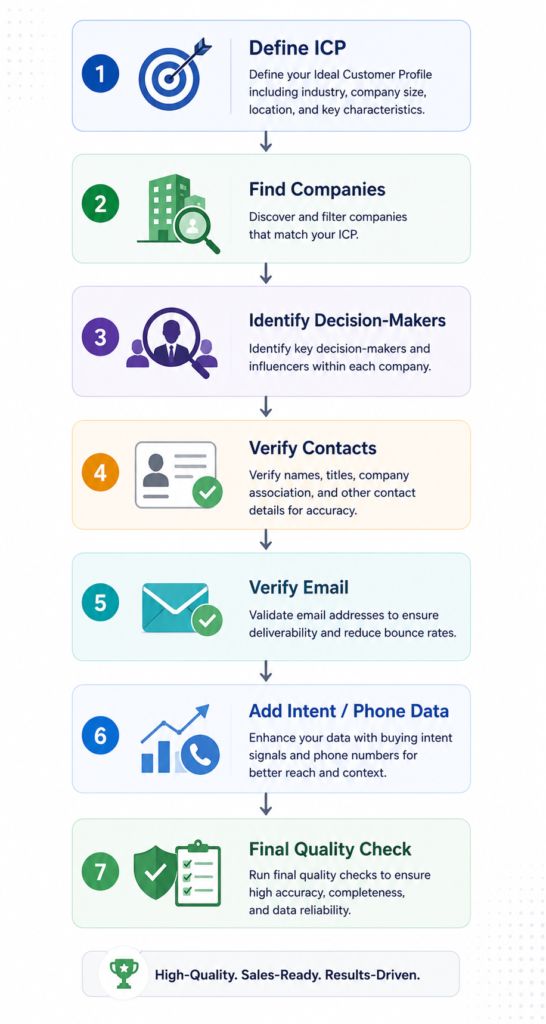
The B2B Lead List Building Process
A Better B2B Lead List Starts With Better Data
Building a high-quality B2B lead list isn’t simply about finding as many contacts as possible. The goal is to identify the right companies, reach the right decision-makers, verify the information, and give sales teams data they can confidently use.
A smaller list of relevant, well-researched and verified contacts can be far more useful than a much larger list filled with outdated or poorly matched records.
By combining clear ICP criteria, human research, contact verification, email validation, relevant intent signals and ongoing data-quality checks, businesses can build prospect lists that are more useful for modern sales outreach.
Need a Sales-Ready B2B Contact List?
Tell us your ideal customer profile, target market and required contact volume. Verified Pipelines can research and verify B2B contacts based on your requirements.